LaTeX back-end
The following options are available when the LaTeX backend is used. Those can be passed as keywords when calling the function pretty_table:
cell_alignment: A dictionary of type(i,j) => athat overrides that alignment of the cell(i,j)toaregardless of the columns alignment selected.amust be a symbol like specified in the sectionAlignment.formatter: See the section Formatter.highlighters: An instance ofLatexHighlighteror a tuple with a list of LaTeX highlighters (see the section LaTeX highlighters).hlines: A vector ofIntindicating row numbers in which an additional horizontal line should be drawn after the row. Notice that numbers lower than 1 and equal or higher than the number of rows will be neglected.longtable_footer: The string that will be drawn in the footer of the tables before a page break. This only works iftable_typeis:longtable. If it isnothing, then no footer will be used. (Default =nothing)noheader: Iftrue, then the header will not be printed. Notice that all keywords and parameters related to the header and sub-headers will be ignored. (Default =false)nosubheader: Iftrue, then the sub-header will not be printed, i.e. the header will contain only one line. Notice that this option has no effect ifnoheader = true. (Default =false)row_number_vline: Iftrue, then a vertical line will be draw after the row number column. This only works ifshow_row_numberistrue. (Default =false)show_row_number: Iftrue, then a new column will be printed showing the row number. (Default =false)table_type: Select which LaTeX environment will be used to print the table. Currently supported options are:tabularfortabularor:longtableforlongtable. (Default =:tabular)tf: An instance of the structureLatexTableFormatthat defines the general format of the LaTeX table.
LaTeX highlighters
A set of highlighters can be passed as a Tuple to the highlighter keyword. Each highlighter is an instance of the structure LatexHighlighter. It contains the following two fields:
f: Function with the signaturef(data,i,j)in which should returntrueif the element(i,j)indatamust be highlighted, orfalseotherwise.fd: A function with the signaturef(data,i,j,str)::Stringin whichdatais the matrix,(i,j)is the element position in the table, andstris the data converted to string. This function must return a string that will be placed in the cell.
The function f has the following signature:
f(data, i, j)in which data is a reference to the data that is being printed, i and j are the element coordinates that are being tested. If this function returns true, then the highlight style will be applied to the (i,j) element. Otherwise, the default style will be used.
Notice that if multiple highlighters are valid for the element (i,j), then the applied style will be equal to the first match considering the order in the Tuple highlighters.
If the function f returns true, then the function fd(data,i,j,str) will be called and must return the LaTeX string that will be placed in the cell.
If only a single highlighter is wanted, then it can be passed directly to the keyword highlighter without being inside a Tuple.
There are two helpers that can be used to create LaTeX highlighters:
LatexHighlighter(f::Function, envs::Union{String,Vector{String}})

LatexHighlighter(f::Function, fd::Function)
The first will apply recursively all the LaTeX environments in envs to the highlighted text whereas the second let the user select the desired decoration by specifying the function fd.
Thus, for example:
LatexHighlighter((data,i,j)->true, ["textbf", "small"])will wrap all the cells in the table in the following environment:
\textbf{\small{<Cell text>}}If the highlighters are used together with Formatter, then the change in the format will not affect that parameter data passed to the highlighter function f. It will always receive the original, unformatted value.
julia> t = 0:1:20;

julia> data = hcat(t, ones(length(t))*1, 1*t, 0.5.*t.^2);

julia> header = ["Time" "Acceleration" "Velocity" "Distance";
                  "[s]"  "[m/s\$^2\$]"    "[m/s]"      "[m]"];

julia> hl_v = LatexHighlighter( (data,i,j)->(j == 3) && data[i,3] > 9, ["color{blue}","textbf"]);

julia> hl_p = LatexHighlighter( (data,i,j)->(j == 4) && data[i,4] > 10, ["color{red}", "textbf"])

julia> hl_e = LatexHighlighter( (data,i,j)->(i == 10), ["cellcolor{black}", "color{white}", "textbf"])

julia> pretty_table(data, header, backend = :latex, highlighters = (hl_e, hl_p, hl_v))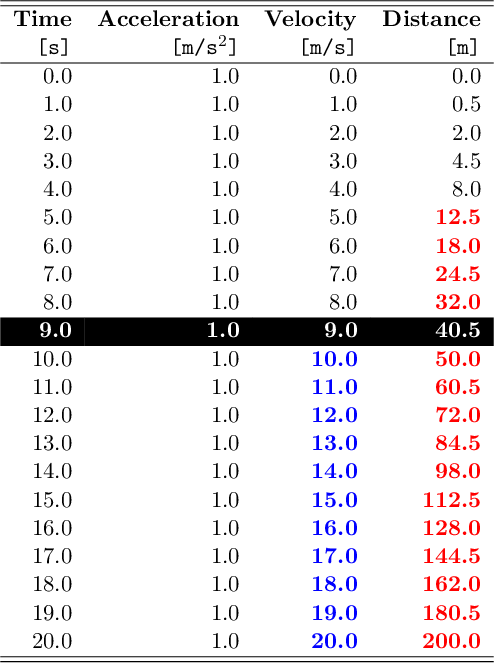
The following LaTeX packages are required to render this example: colortbl and xcolor.
LaTeX table formats
The following table formats are available when using the LaTeX back-end:
latex_default (Default)
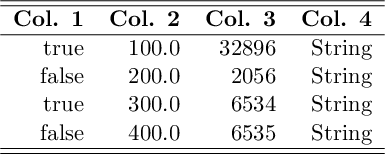
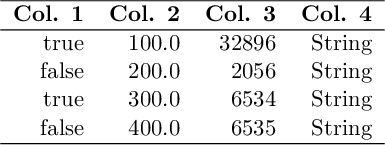
latex_simple